

change the look of strumpatterns.com!
It's my goal to make this site as usable for everyone as I can. So, there are some people who have a difficult time reading certain colors, others who prefer reading black on white, or just like a change of scenery from time to time. No matter the reason, I created a 2nd layout for you.
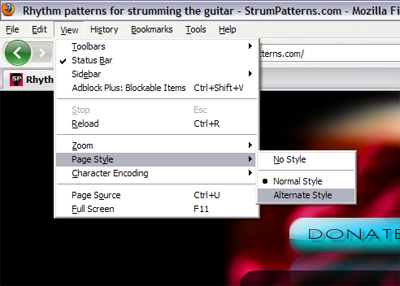
To access it you will go to the "View" menu in your web browser and to the "Style" or "Page Style" option and select "Alternative Style." That's it! Once you've done that, your preference is automatically saved for the next time you visit (unless your browser or security settings don't allow web pages to remember things through cookies). If you want to change back, go to the same place but select "Normal Style ."
As a note, some of the images will have an unsightly black border around them, but still the page should at least be more legible for you.
For those who'd like to load it manually, you can download the alternative style sheet here. Depending on your system, browser, and personal settings , some users may have to right click (or alt-click) the link and select "save link" from the menu.
Here's how access the alternative style sheets option in Firefox:
Here's the option in Internet Explorer:

I don't have a screenshot for Safari, but apparently it's accessed by going to Menu-->Preferences->Advanced-->Style sheet. One of my visitors informed me that you'd have to download the stylesheet first, and then load it.
Currently, Google Chrome doesn't allow alternative style sheets natviely, but there are add-ons, such as this one, that will allow you to do it. If Chrome gets this fixed, please let me know.
Hope that helps your browsing experience! There may be other sites that have alternative style sheets, so give it a try in your favorite site (your favorite besides strumpatterns.com of course).
Eventually, I plan on doing a redesign of the entire site and plan on making black text on white background the default style.

![[submit to delicious]](../images/other/deliciousIcon.jpg)
![[submit to digg]](../images/other/digg.gif)
![[submit to reddit]](../images/other/reddit.gif)